



- Security questionnaire automation uses AI to auto-fill repetitive compliance questions — certifications, encryption standards, data handling policies — that appear across nearly every vendor assessment
- Manual questionnaire completion typically takes 5–15 hours per request; automation reduces this to under an hour with higher consistency
- Accuracy depends on a continuously updated knowledge base that reflects current certifications (SOC 2, ISO 27001) and policy changes
- SiftHub’s RFP Agent handles security questionnaires alongside RFPs and DDQs, pulling verified answers from a single source of truth
- Automated source attribution on every response lets infosec reviewers verify compliance claims without hunting through documentation
- Security questionnaire automation uses AI to auto-fill repetitive compliance questions — certifications, encryption standards, data handling policies — that appear across nearly every vendor assessment
- Manual questionnaire completion typically takes 5–15 hours per request; automation reduces this to under an hour with higher consistency
- Accuracy depends on a continuously updated knowledge base that reflects current certifications (SOC 2, ISO 27001) and policy changes
- SiftHub’s RFP Agent handles security questionnaires alongside RFPs and DDQs, pulling verified answers from a single source of truth
- Automated source attribution on every response lets infosec reviewers verify compliance claims without hunting through documentation
Security questionnaires can contain hundreds or even thousands of questions, especially for large enterprises, making them a tedious and time-consuming task for businesses.
Many professionals cite tight deadlines, difficulty getting input from subject matter experts, and overwhelming volumes of scattered compliance documentation as major challenges. Redundant, outdated, or trivial content further complicates the security questionnaire process.
Security questionnaire automation offers a direct solution to these challenges. Using advanced security questionnaire automation tools, teams can answer complex assessments in minutes rather than hours. It streamlines the entire security questionnaire process from intake to submission while maintaining accuracy, consistency, and compliance.
This article explains what security questionnaire automation is, how it works, and why it’s essential for organizations managing multiple vendor security assessments, particularly in industries where regulatory requirements and security compliance questionnaires are the norm. Discover how questionnaire automation tools help your team reclaim valuable time and reduce the manual effort involved in every security questionnaire response.
Understanding the role of security questionnaires in risk management
Security questionnaires serve as the first line of defense in modern vendor risk management and overall risk management programs. They help you evaluate potential risks before forming business partnerships and make informed decisions about your vendor relationships.
Why organizations use security questionnaires
Your business relies on security questionnaires to assess the security posture of vendors, partners, and service providers. These assessments are a key part of any compliance framework, ensuring that your company remains protected against cyber threats.
Security questionnaires help you identify vulnerabilities before they become liabilities. Through detailed inquiries, organizations evaluate whether potential partners meet internal security standards and align with broader security questionnaire management strategies.
These tools also act as validation mechanisms for declared policies. Clients and partners want assurance that your stated security measures align with best practices and comply with regulations. This builds trust and fosters strong relationships over time.
For companies responding to security questionnaires, the process becomes a way to showcase security credentials and maturity. It’s also an opportunity to align internal policies with external expectations through documentation such as compliance certifications, internal assessments, and more.
Organizations handling sensitive data often rely on security compliance questionnaires to demonstrate adherence to standards like ISO 27001, SOC 2, GDPR, HIPAA, and PCI DSS. With the right security questionnaire software, this can be simplified and standardized across every request.
Common topics covered in security questionnaire: Encryption, access control, and incident response
Security questionnaires typically cover several critical areas that reflect the strength of an organization’s information security practices. Among the most important: encryption, access control, and incident response.
Encryption ensures that data in transit and at rest remains secure. Security questionnaire tools often include standard questions around encryption methods, key management, and algorithm standards.
Access control focuses on authentication mechanisms, permission policies, and user access procedures. Organizations need to explain how access is granted, managed, and revoked across systems.
Incident response questions examine preparedness and response plans. Organizations must demonstrate their ability to detect, report, and mitigate incidents, detailing roles, timelines, and communication strategies.
Other areas covered in a security questionnaire guide may include governance, business continuity, third-party risk, infrastructure security, and data center security. The scope varies, but the objective remains consistent: to verify that an organization’s security posture meets the standards required for doing business safely.
Step-by-step breakdown of security questionnaire automation
Security questionnaire automation tools break down complex tasks into manageable stages. Automation reduces time, improves accuracy, and ensures compliance.
Step 1: Intake and request routing a security questionnaire
Modern platforms support various formats, including Excel, PDFs, Word docs, and vendor automation portals, making it easy to plug them anywhere and answer questionnaires.
The intake system can prioritize based on client tier, business impact, or SLA, routing them intelligently to the right team members.
When connected to software like Salesforce, Jira, Notion, Slack, and the like, the intake workflow becomes even more seamless. These integrations power more structured security questionnaire management, eliminating unnecessary back-and-forth and speeding up time to response.
Where does SiftHub come in this
SiftHub intelligently classifies every incoming request by format, priority, and business context and routes it to the right owners instantly. It connects seamlessly with tools like Salesforce, Teams, Slack, and more to create a structured, SLA-aligned pipeline, eliminating manual triage and reducing time-to-response across teams.
Step 2: Auto-fill the security questionnaire using the answer bank
The backbone of many security questionnaire automation platforms (like SiftHub) is the answer bank or security questionnaire library. This searchable database pulls from:
- Previously submitted security questionnaire responses
- Internal compliance documentation and policies
- Integrated compliance platforms like Drata or Hyperproof
Where does SiftHub come in this
SiftHub is the intelligence behind the auto-fill. It scans each question, understands intent even when phrased differently, and pulls precise, audit-ready answers from your library. Whether the content lives in past responses, policies, or synced platforms, SiftHub delivers the right response instantly, helping your team move from zero to complete in a few clicks.
Step 3: Review and human verification of the security questionnaire
Even with automation, human oversight ensures quality. The system categorizes responses by confidence:
- Unanswered – needs SME input
- Draft – needs quick review
- Complete – high-confidence, auto-approved
RFP response tools like SiftHub offer Slack or Teams integrations, letting SMEs review directly within their daily workflows. This accelerates the review process while keeping the team aligned and accountable.
Where does SiftHub come in this
SiftHub doesn’t just generate answers; it supports smart review loops. Responses are auto-categorized by confidence level, and SMEs can be looped in instantly for reviews. No tool-switching, no confusion, just fast, contextual reviews that keep your process moving without compromising accuracy or accountability.
Step 4: Export and submit responses
Traditionally, completing a security questionnaire means juggling multiple steps: downloading the file, tracking down responses, manually copying content, attaching evidence, and re-exporting it all back into the right format. It’s time-consuming, error-prone, and disruptive, especially when every vendor uses a different format or portal.
Where does SiftHub come in this
SiftHub removes the friction entirely. It works directly inside Excel, Word, Google Sheets, or vendor portals, auto-filling responses, linking supporting documents, and finalizing submissions in place. There’s no exporting, no reformatting, and no version chaos. Just fast, audit-ready output delivered faster, exactly where your team needs it.
Building and maintaining an answer library
A robust security questionnaire library is essential for scaling response automation. With the right content, you reduce duplication, ensure consistent messaging, and answer recurring questions quickly.
Importing past security questionnaires to seed the library
One of the first steps in building your answer library is importing previous security questionnaires and assessment frameworks. This creates a foundation based on real-world documentation.
Import tools often support:
- Spreadsheet uploads
- Framework-based imports (e.g., SIG, CAIQ)
- Dynamic library creation during upload
This proactive approach to content curation powers faster turnaround times and more accurate answers.
Tagging, ownership, and review cycles
To keep your content organized, tagging is critical. Use tags based on framework, control type, business unit, or product. Assign answer ownership to SMEs, who are responsible for ensuring the information stays updated.
Regular review cycles support long-term accuracy. Teams can set quarterly review checkpoints to align answers with evolving processes or policies. This keeps the questionnaire response automation engine sharp and reliable.
Attaching evidence and compliance documents
Many security questionnaires request attachments, such as SOC 2 reports, incident response plans, or access control policies. With the right security questionnaire software, you can attach documents directly to relevant answers.
Store these files in the answer bank, link them to specific topics, and maintain version control so that outdated attachments never get reused. Organizing evidence at this level turns your knowledge base into a submission-ready package.
Improve collaboration and workflow efficiency
Security questionnaire automation tools are only as good as the workflows they support. Collaboration across departments is key to timely, accurate responses.
Assign tasks to SMEs via Slack or Teams
Modern automation platforms allow real-time task assignment through integrations with communication platforms. SMEs are notified of outstanding questions within the tools they already use.
This approach cuts out unnecessary emails and accelerates coordination across legal, IT, compliance, and security teams, helping you complete even complex vendor security assessments faster.
Track progress with real-time dashboards
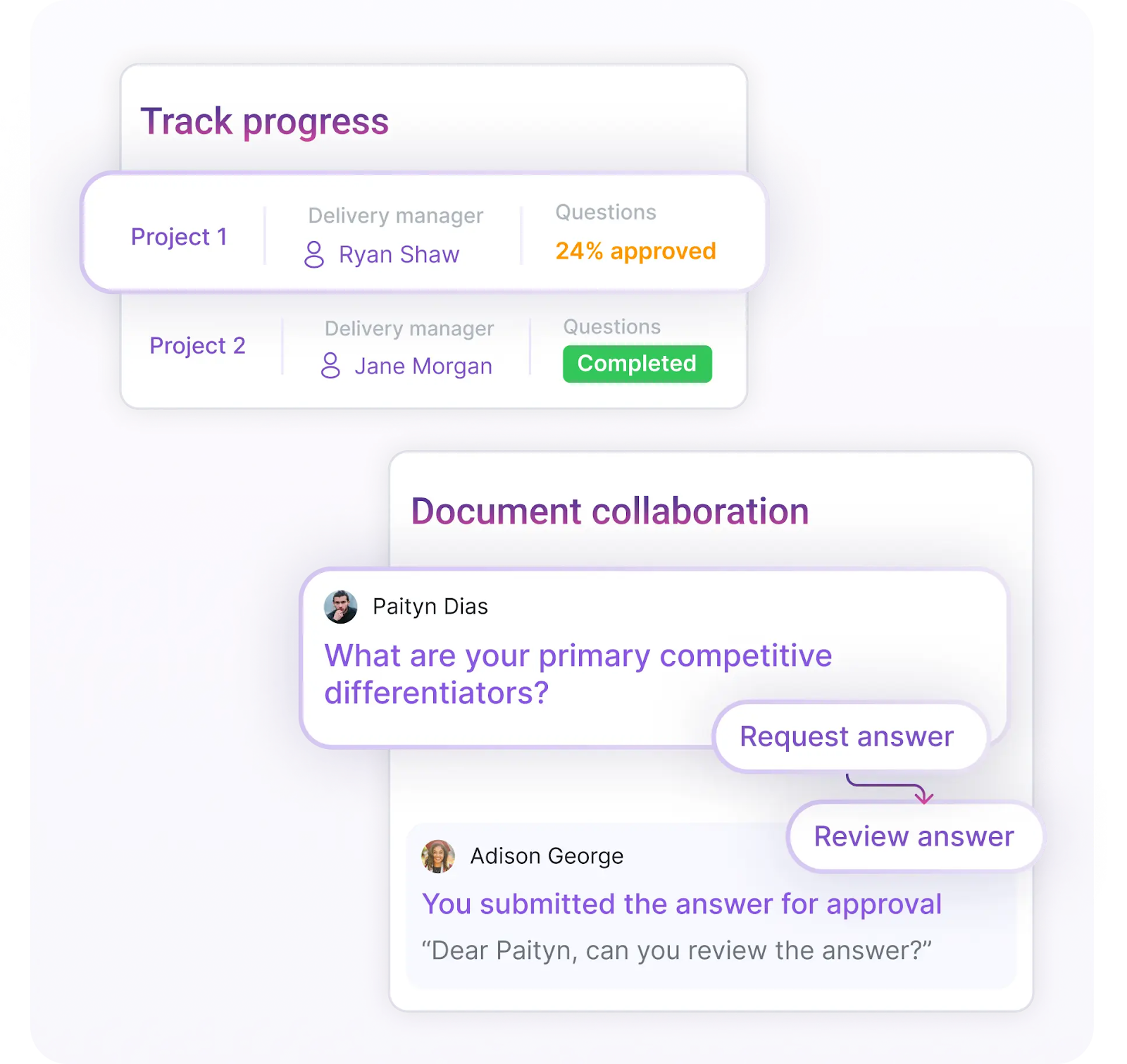
As deadlines approach, visual dashboards provide real-time progress tracking. Teams can view completion percentages, bottlenecks, and assignment status at a glance, an enormous improvement over spreadsheet tracking.
This visibility allows project owners to catch delays early and ensure on-time submission without scrambling. Each security questionnaire is tracked through to completion.
Automated reminders and SLA enforcement
Most security questionnaire automation tools include smart notifications and reminders. These are customizable based on SLAs (Service Level Agreements) or internal workflows, ensuring priority requests don’t slip through the cracks.
Notifications trigger based on unanswered questions, pending approvals, or upcoming deadlines. This type of automation dramatically reduces follow-up effort, increases accountability, and aligns stakeholders from intake to submission.
With collaborative features, even the most challenging security questionnaires can be completed with consistency, accuracy, and minimal stress.
Ensure accuracy and compliance with automation tools
Automating security questionnaires doesn’t mean sacrificing precision. The best security questionnaire automation tools are built with compliance and audit readiness in mind.
AI-based answer rephrasing and validation
AI tools not only generate responses, but they also ensure tone, context, and compliance alignment. These platforms learn from your existing data to craft relevant, precise answers, even when questions are phrased differently.
This ensures consistency across security questionnaire responses, minimizing follow-ups from clients or auditors and reducing discrepancies.
Audit trails and version history for every response
Every action in your security questionnaire software is logged, from who wrote or edited an answer to when and why. This creates a comprehensive version history and audit trail for each submission.
These logs support regulatory compliance and serve as internal documentation of your evolving risk management program and compliance framework.
Content health metrics and deduplication
Content quality matters. Tools built for security questionnaire management often include dashboards that display content usage, update history, and duplication trends.
These insights help you eliminate unnecessary content, replace outdated answers, and ensure only the most relevant material is used. Smart deduplication features consolidate responses and maintain consistency across all questionnaire response tools and platforms.
Conclusion
Security questionnaire automation is more than a convenience; it’s a strategic advantage. It empowers security and compliance teams to process more requests faster, with fewer errors and better outcomes.
The full lifecycle, from intake to auto-fill, review, export, and collaboration, is streamlined by security questionnaire automation tools designed for scale. Building a high-quality security questionnaire library ensures that responses remain accurate, timely, and aligned with evolving regulations.
Collaborative workflows, smart notifications, and real-time tracking eliminate delays. Teams can meet SLAs, respond to clients confidently, and maintain an organized audit trail for every action.
As security questionnaires continue to increase in complexity and volume, the need for efficient, automated solutions is clearer than ever. Investing in the right security questionnaire software and workflow transforms risk assessment into a faster, smarter, and more strategic process. SiftHub is one such tool that streamlines the entire process for you. Book a demo today and learn more about SiftHub.

.avif)